NPCS Police Clearance Online Appointment 2026: Requirements, Registration & Fees
Every year, thousands of Filipinos apply for an NPCS Police Clearance Online for employment, business, travel, education, and other official purposes. While the process is now faster through the National Police Clearance System (NPCS), many applicants still face challenges such as account registration, appointment booking, payment verification, or application status errors. This guide walks you through every step of the online process from creating your NPCS account to downloading your clearance while sharing practical tips to help you avoid delays and complete your application smoothly.
What is PNP Police Clearance System?
The PNP Police Clearance, also known as the National Police Clearance (NPC), is a document issued by the Philippine National Police (PNP) to confirm that an individual does not have any criminal record or pending case listed in the national police database. It is commonly required when applying for a job, securing government documents, starting a business, or completing certain travel and legal requirements.
Because it is recognized nationwide, the clearance serves as important proof of good standing for various personal and professional transactions.
Different Types of Clearance Certificates in Philippines
There are several types of clearance certificates in the Philippines, each issued by different authorities for specific purposes such as employment, legal verification, and travel requirements.
| Type of Clearance | Issuing Authority | Purpose / Usage | Validity / Coverage |
|---|---|---|---|
| National Police Clearance (NPC) | Philippine National Police (PNP) | Used for employment, government transactions, and legal requirements. | Valid nationwide (usually 6 months). |
| Local Police Clearance (LPC) | Local Police Stations | Required for local employment, business permits, and community-related legal matters. | Valid only within the local jurisdiction. |
| Barangay Clearance (BC) | Barangay Office | Proof of good moral character and residency within the barangay. | Limited to the barangay level. |
| Police Clearance for Overseas Employment (PCC-OE) | Philippine National Police (PNP) | Required for overseas employment, visa applications, and foreign work requirements. | Generally accepted for international use. |
| NBI Clearance | National Bureau of Investigation (NBI) | Comprehensive background check for employment, passports, visas, and legal purposes. | Valid nationwide. |
National Police Clearance Eligibility and Requirements
Before starting your Police Clearance Online application, make sure you meet the eligibility requirements and have all the necessary documents ready. Having the correct information and valid IDs prepared in advance can help you avoid delays, rejected applications, or appointment issues.
Who is Eligible for a Police Clearance?
You may apply for a Philippines National Police Clearance if you are
- A Filipino citizen
- A foreign national who has lived in the Philippines for at least six months
Requirements for Police Clearance Online Application
To complete your application successfully, you will need the following:
Digital Requirements
Active Email Address
- Use a personal Gmail or Yahoo email account.
- Avoid using work or school email addresses, as you may lose access to them later.
Mobile Number
- A valid mobile number is required to receive verification codes and important updates regarding your application.
Valid Identification Cards
Applicants must present at least two (2) original valid IDs during their appointment. Photocopies alone are not accepted.
| Preferred Valid IDs | Alternative Valid IDs |
|---|---|
| Passport | TIN ID (PVC card version) |
| Driver’s License | PhilHealth ID |
| UMID Card | Postal ID |
| PhilSys National ID | PSA Birth Certificate (as supporting document) |
| PRC ID | |
| Voter’s ID |
NOTE: The personal information entered during registration must exactly match the details shown on your valid IDs. Even small differences in your name, initials, abbreviations, or suffixes such as “Jr.” or “III” may cause verification issues during your appointment and could delay the release of your police clearance.
Before You Start Your Police Clearance Application
After reviewing the official National Police Clearance System (NPCS) process and analyzing the most common issues reported by applicants, one thing becomes clear: most delays are not caused by the police station itself. They usually happen because of small mistakes made during online registration, incorrect personal information, payment verification problems, or confusion about a “Hit” status.
That is why this guide goes beyond simply listing the official steps. Along with the complete application process, you’ll also find practical tips, common mistakes to avoid, and solutions to issues that frequently delay Police Clearance applications. Spending a few extra minutes reviewing these details before you apply can save you unnecessary time, extra visits, and frustration later.
Police Clearance Online Application Process: Step-by-Step Guide (2026)
Here is the exact step-by-step guide to getting PNP police clearance.
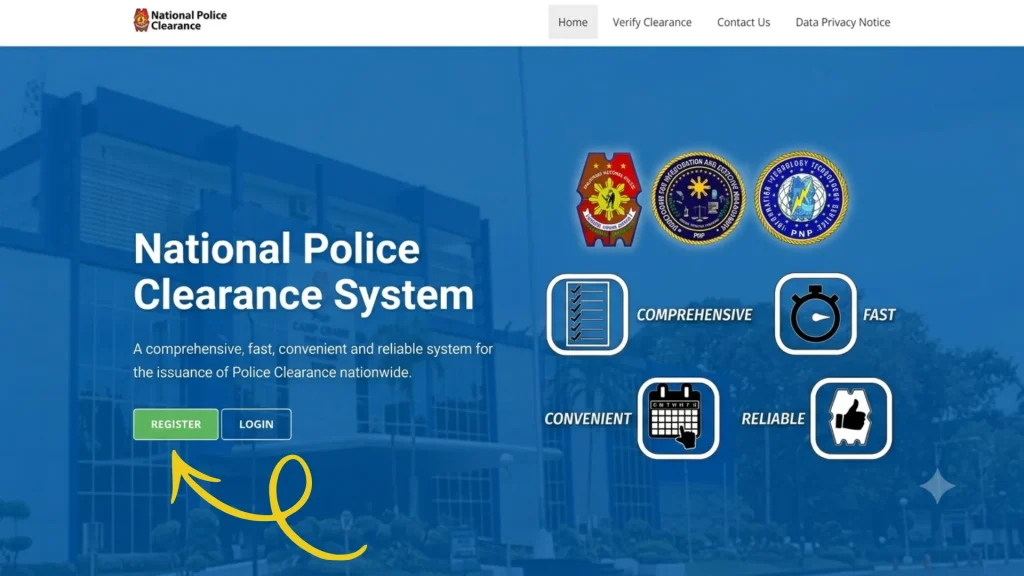
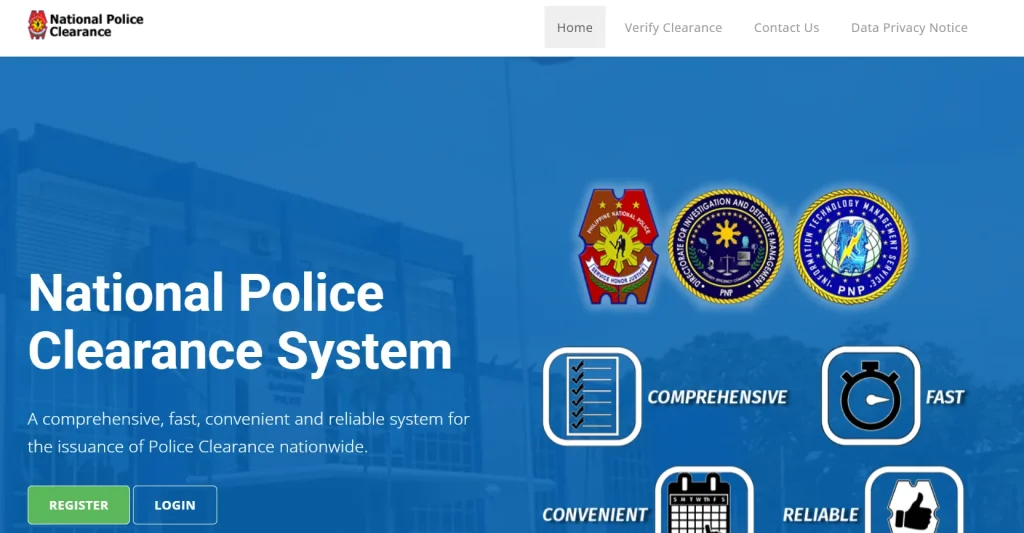
- Step 1: Click the below button to visit the official “National Police Clearance” website.
- Step 2: Click on the “Register” button.
- Step 3: Read “Terms and Conditions” carefully and check all the “Tick Boxes” to proceed. Click on “Next.”
- Step 4: Enter your valid and active “Email Address” carefully.
- Step 5: Enter a strong “Password” that contains
- One lowercase letter
- One uppercase letter
- One number
- One special character (e.g., @, $, !, %, *, #, ?, &, _, ^, (, ), -)
- Minimum length of 12 characters
- Step 6: Enter your “First, Middle, and Last Name.”
- Step 7: Select your “Qualifier” and “Gender.”
- Step 8: Enter your “Date of Birth (DOB).”
- Step 9: Hit the “Register” button.
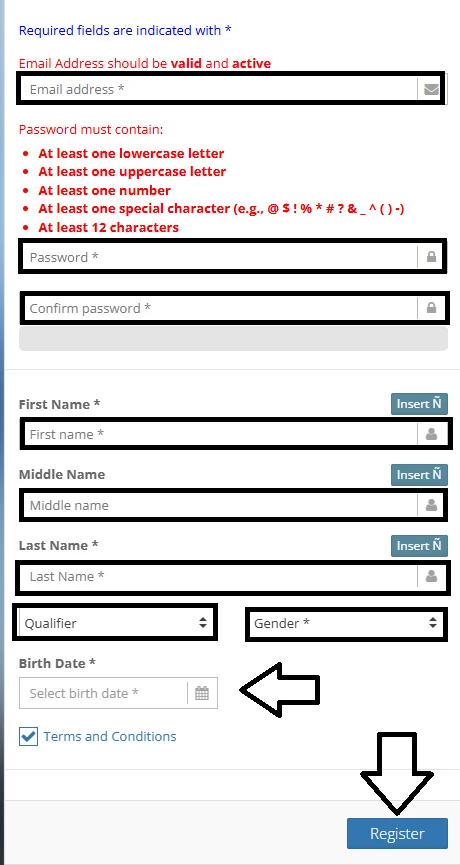
Important Note: Check all entered information carefully. Changes cannot be made once submitted.
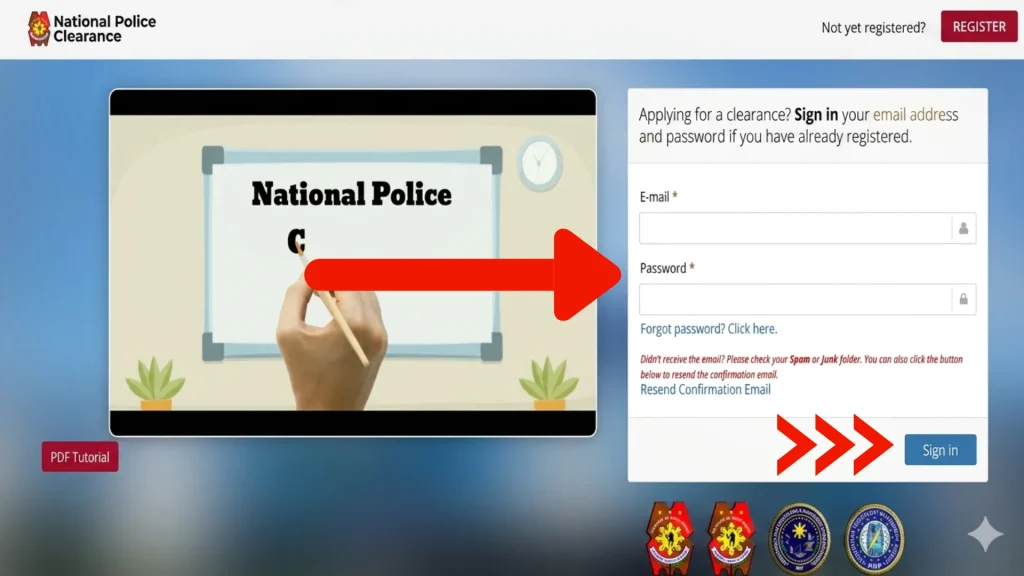
- Step 10: Then enter your “Email and Password.”
- Step 11: Tap on “Sign in.”
- Step 12: Once you log in, your details will be displayed, and you will need to fill in the additional required information.
- Step 13: Carefully check the box if any of the following apply to you:
- You are a Person with Disability (PWD)
- You are a First-Time Job Seeker under RA 11261 (First Time Job Seeker Assistance Act)
- Step 14: Choose your “Nationality and Birth Place.”
- Step 15: Carefully enter your “Contact and Address” details.
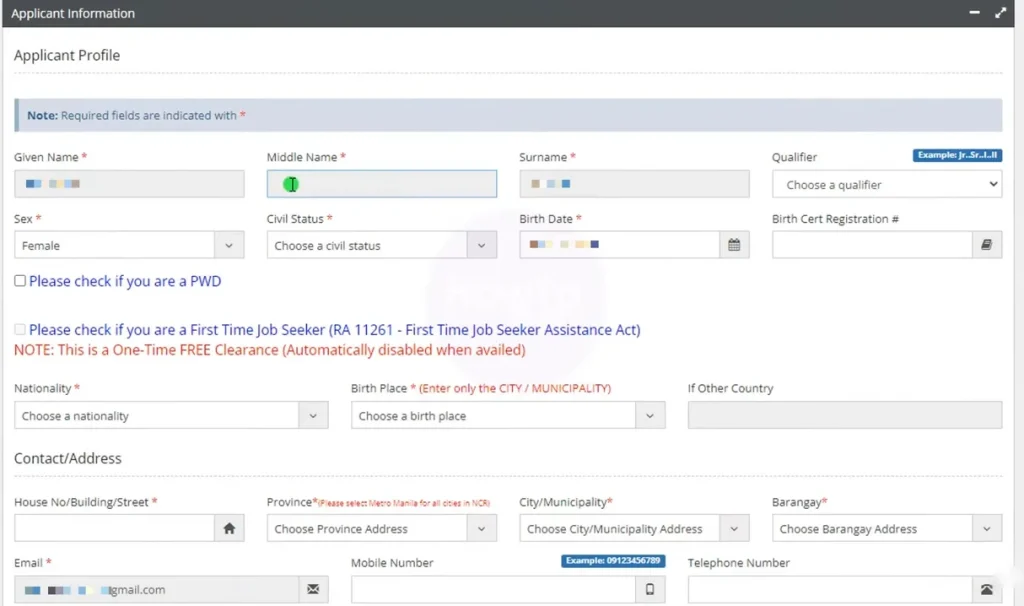
- Step 16: Enter “other required details” for Philippines police clearance, such as
- Height
- Weight
- Complexion
- Your Blood Type
- Religion
- Educational Attainment
- Occupation

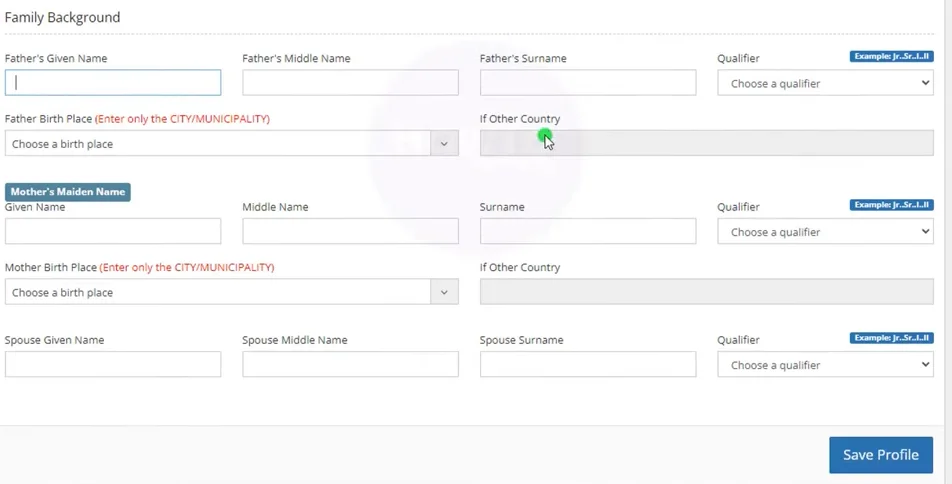
- Step 17: Enter your “Family Background”
- Father’s and Mother’s given names, middle names, and Surnames
- Qualifier
- Father’s and Mother’s birthplace
- Step 18: Click on “Save Profile.”
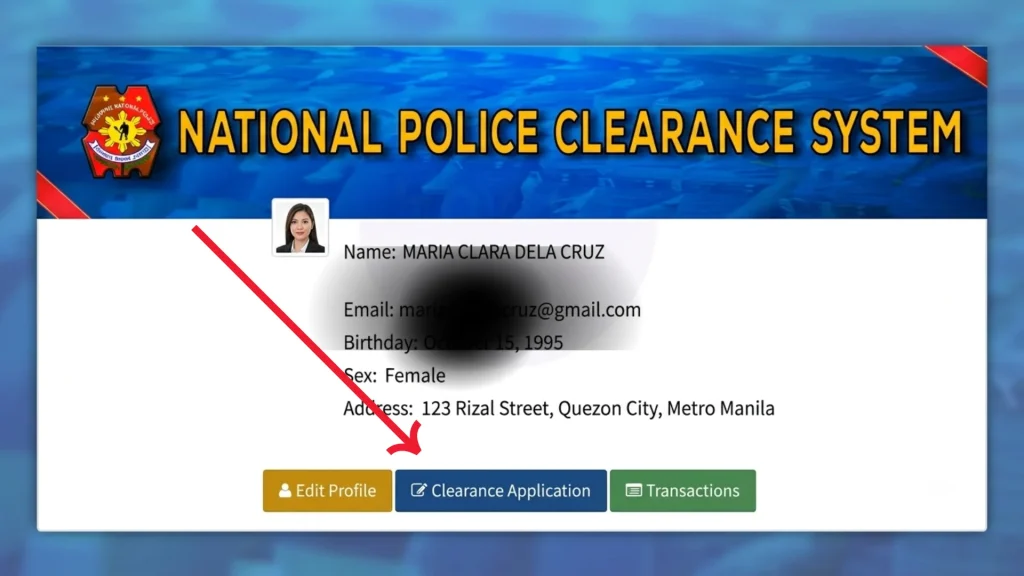
- Step 19: Tap on the “Clearance Application” option.
- Step 20: Select “Purpose,” such as “General,” “LTOPF Application,” or “SOSIA.”
- Step 21: Select the nearest “Police Station” from the list.
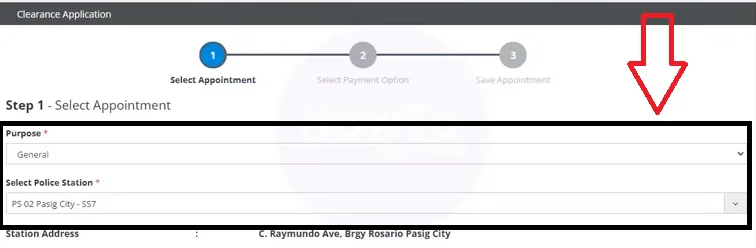
- Step 22: Choose the available “Date for Appointment” and tap on the “Next” button.
- Step 23: Select the “Payment Option” to complete your police clearance online appointment.
- Step 24: Click on “Next” and carefully review all information.
- Step 25: Then tap on “click here to pay.”
- Step 26: Follow the screen prompt to pay your police clearance fee. Once your payment is successfully completed, download and print your fee payment receipt. Make sure to bring this receipt with you on the day of your appointment.
PNP Police Clearance Online Payment Process
Method 1: Via GCash
After selecting the payment option on the LandBank (LBP) screen, choose “Cash Payment” or the GCash option if available.
You will then see a Payment Reference Number on your screen. Make sure to take a screenshot immediately because you will need it later. Now follow these steps:
- Open your GCash app
- Go to Bills Payment
- Select Government
- Look for “National Police Clearance” or “LandBank” (use the exact merchant name shown on the LBP page)
- Enter your Payment Reference Number
- Type the exact amount to be paid
- Confirm and complete the payment
After payment, go back to the website and wait for confirmation. Your status should change from “Pending” to “Paid.”
Method 2: via 7-Eleven (ECPay)
If you choose 7-Eleven, select the “Cash Payment” option and then choose 7-Eleven. Follow these steps:
- Save or screenshot your Payment Reference Number
- Visit any 7-Eleven store with a CLIQQ kiosk
- On the kiosk, go to Bills Payment
- Select Government
- Choose National Police Clearance
- Enter your Reference Number
- Pay the required amount at the counter
Once done, keep your receipt as proof of payment.
Visit the Police Station on Your Scheduled Appointment Day
On your scheduled appointment day, go to the police station you selected and complete your application process.
Make sure to bring the following requirements with you:
- Your registered email address
- Two valid government-issued IDs (such as passport, driver’s license, or national ID)
- Payment and appointment receipts
- Reference number
Once you arrive, the police staff will guide you through the process, which includes capturing your photo, fingerprints, and digital signature. They will also verify your documents, so follow their instructions carefully to avoid any delays.
Police Clearance Release: With Hit vs. Without Hit Explained
After biometrics, the system immediately checks your records in real time. There are usually two possible outcomes:
Scenario A: “No Hit” (Clear Record)
If no match is found in the database:
- It means you have no criminal record linked to your name
- Your application is processed instantly
- Your police clearance is printed and released within a few minutes
Scenario B: “With Hit” (For Verification)
If the system finds a possible name match:
- Your clearance will be temporarily put on hold
- This does not always mean you have a record (it can be a namesake issue)
- Your application status will change to “For Verification.”
Verification Process
- The PNP verification unit will manually check the record
- They will confirm whether the match belongs to you or someone with the same name
- This process usually takes 5 to 15 working days
- You will be contacted by the police station once the review is completed
Final Outcome
- If it’s just a namesake → your clearance will be released
- If identity is unclear → you may be asked to submit an Affidavit of Denial
Police Clearance Online Cost
The standard fee for a National Police Clearance (NPC) is ₱150. If you pay online, there is usually a small extra charge for convenience or transaction processing, which is around ₱10 to ₱30. So, in total, you can expect to pay roughly ₱160 to ₱180 depending on the payment method you choose.
PNP National Police Clearance Validity
A Philippine National Police (PNP) clearance is valid for six (6) months from the date it is issued. After this period, it automatically expires and cannot be used for official transactions anymore. If it expires, you will need to apply for a new clearance instead of extending it.
How to Verify a Police Clearance Certificate Online in 2026
Thanks to the NPCS, the PNP now provides a faster and more convenient online verification system that is directly connected to its central clearance database. To verify a clearance certificate, follow these steps:
- Step 1: Visit the official PNP Clearance website.
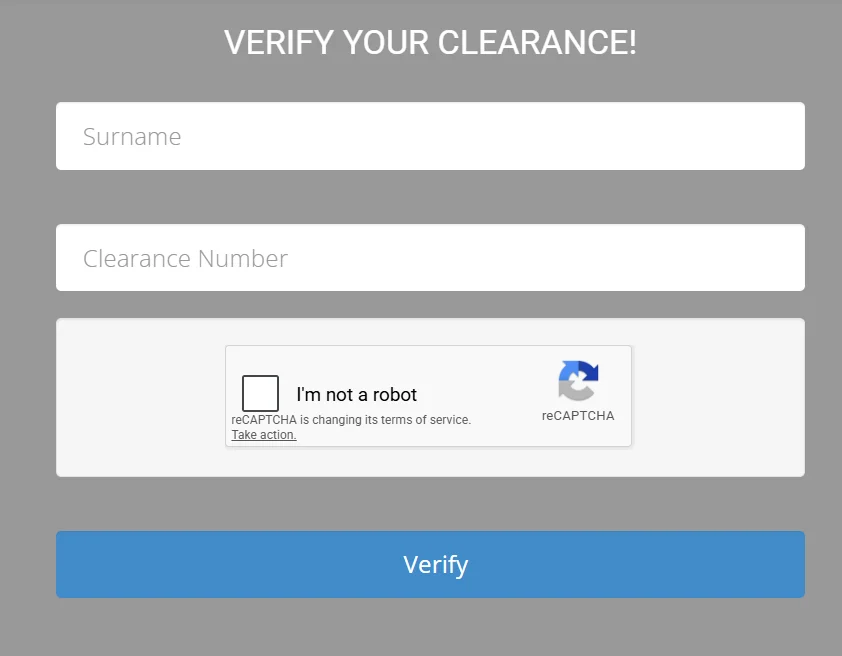
- Step 2: Click on “Verify Clearance.”
- Enter your “Surname” and “Clearance Number.”
- Complete “CAPTCHA” and click on “Verify.”
How to Download a Police Clearance in the Philippines
Once you have created an NPCS account and successfully submitted your online application, the next step is to obtain your Police Clearance Certificate. You can do this through either of the following methods:
Method 1: Download Your Certificate Online (Digital Copy)
Many police stations provide a digital version of the certificate, allowing applicants to access and download it without visiting the station.
Steps:
- Log in to your NPCS account.
- Check your application status. Once your application has been approved, a download link will become available.
- Download the certificate and save it as a PDF for future reference.
- Print a copy (optional) if you need a physical document for employment, travel, legal transactions, or other official purposes.
Tip: While a digital copy is often accepted, some organizations may require the official printed certificate. Be sure to verify the requirements of the requesting institution.
Method 2: Claim Your Certificate at the Police Station
If you prefer to receive a printed copy, you may visit the police station where you scheduled your appointment.
Steps:
- Prepare the required documents:
- Two (2) valid government-issued IDs
- Your NPCS reference number
- Proof of payment or official receipt
- Complete biometric verification (if not previously done).
- Fingerprints
- Photograph
- Electronic signature
- Wait for processing.
- Processing times vary by station and may take between 3 to 15 working days.
- Receive your Police Clearance Certificate.
- Once your application has been processed and approved, the officer will release your official printed certificate.
Police Clearance Office Hours in the Philippines
- Monday to Friday: 8:00 AM to 5:00 PM
- Saturday: Some locations may be open, typically until noon
- Online Services: Applications and status updates are available online 24/7, including outside regular office hours
Are Walk-in Applications Allowed for Police Clearance?
Walk-in applications are generally not allowed under the current NPCS system. The process is now fully based on online registration and appointment scheduling through the Philippine National Police System.
However, some local police stations may still accept walk-in applications for Local Police Clearance (LPC), but this depends on their individual policies. It is always best to confirm with your nearest police station before visiting.
Overall, the recommended and most convenient method is to apply online, as it helps avoid long queues and makes the entire process faster, smoother, and more organized.
Why LPC Was Replaced by NPC
The old local police clearance, the LPC, had a fundamental structural problem. Here is why it was phased out and what replaced it:
The Old System (LPC):
- Limited Reach: Valid only within the town it was issued in. A fugitive in Manila could get a clean record in Cebu because databases were not linked
- Disconnected Data: No cross-referencing between municipalities meant inconsistent and exploitable records
- Inconsistent Formats: Certificate formats varied wildly from one municipality to the next
The Current System (NPC):
- Nationwide Scope: Cross-references the centralized PNP Crime Research and Analysis Center (CRAC) database
- High Security: Every document carries a QR code for instant authenticity verification
- Biometric Data: Your digital signature, thumbprints, and photo are permanently stored on the national server
By 2026, with the Data Privacy Act enforcement tightening and the PhilSys National ID rollout maturing, employers and banks no longer accept old-style local clearances. They demand the National Police Clearance proof that you have no criminal record anywhere in the Philippines, not just within your barangay certificate.
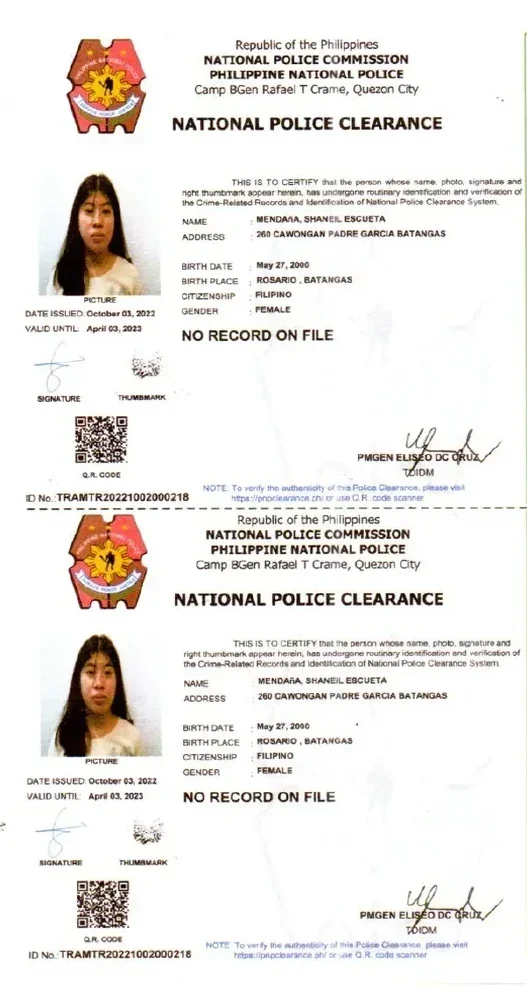
Philippine Police Clearance Sample
Key Features of the National Police Clearance
| Feature | Description |
|---|---|
| Nationwide Scope | Your background is checked against a centralized PNP database, not just local police records, ensuring a more complete verification. |
| Quick Processing | If there is no “HIT” or record issue, the clearance can be released in as fast as 15–30 minutes after biometrics are taken. |
| Online Accessibility | Applicants can easily register, book appointments, and choose their preferred police station through the National Police Clearance System. |
| Digital Verification | Each clearance includes a unique QR code that allows employers and agencies to quickly verify its authenticity online. |
| Biometric Integration | The system captures fingerprints, digital signatures, and photos securely to ensure accurate identity verification. |
Tips For Scheduling a Hassle-Free Appointment
Before Your Appointment:
- Always provide valid, updated documents when booking online. Fill every field with accurate details exactly as they appear on your official documents
- Take a screenshot of your payment receipt the moment it appears; this proof of payment is required at the station
- Appointments are only available Monday through Friday no weekend slots; choose between morning and afternoon time slots based on your schedule
If Something Goes Wrong:
- Missed your appointment? You have 15 days to visit the selected police station and complete the process without paying again. Go beyond that window and your payment is forfeited
- Error on your printed clearance? You cannot edit details after printing; you will need a new appointment and new payment at the same police station for biometrics
- Need to verify your clearance? Visit the NPCS website, click Verify Clearance, enter your surname and clearance number, complete the CAPTCHA, and click Verify
At the Station:
- Cooperate with staff and follow their instructions throughout
- Check your certificate carefully before leaving; report any error to the staff immediately
- Contact the PNP helpline if you encounter any issue during registration, login, or online appointment booking
National Police Clearance Contact Details
- Philippine National Police Headquarters, Camp Crame, Quezon City, Philippines
- (02) 8723-0401 loc. 7663
- (02) 723-0401 loc. 7663
Online Police Clearance Platform:
- Official Website: https://pnpclearance.ph
- Email Support: [email protected]
- PNP General Hotline: 117 or 911
Frequently Asked Question About Police Clearance Online
Conclusion
Getting a Philippine National Police Clearance online has become a more efficient and secure process in 2026, thanks to the fully digital NPCS system. However, applicants must still be careful when entering details, booking appointments, and completing payments to avoid delays or “hit” verification issues. By following the correct steps, preparing valid requirements, and understanding possible outcomes, you can complete your application smoothly. This guide ensures a faster, hassle-free experience for employment, travel, and other official purposes in 2026.