How to Edit Police Clearance Application Information Online
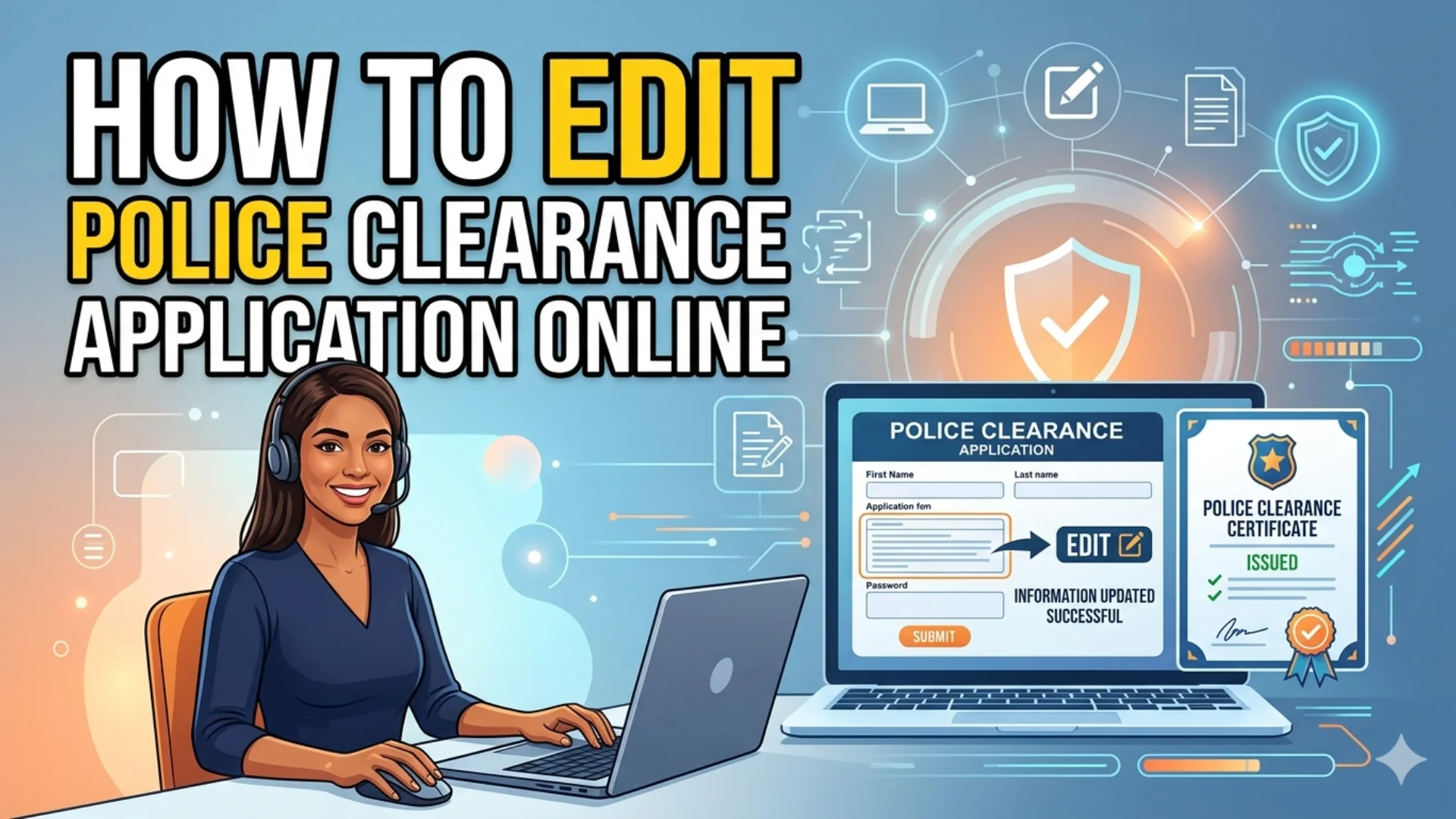
How to Edit Police Clearance Application Information Online? If you have already submitted your Philippine National Police (PNP) clearance application online and realized you made an error by accidentally entering incorrect personal information during the application process. Whether it is a misspelled name, wrong birth date, incorrect address, or an error in other personal details, you are not alone; correcting these mistakes is essential to avoid delays and verification issues. Understanding how to edit police clearance application information online in the Philippines is essential for ensuring a smooth and hassle-free process.
This guide explains the available correction options, step-by-step procedures, and important tips to help you update your application accurately and efficiently.
Why You Need to Edit Your Police Clearance Application
There are several common reasons why applicants need to go back and correct their submitted application information:
- Typographical Errors: A misspelled first name, middle name, or last name is the most common mistake. Even a single wrong letter can create inconsistencies between your clearance and your valid ID.
- Wrong Date of Birth: Entering an incorrect birthdate even off by one day can cause a mismatch in the biometric verification process at the PNP station.
- Incorrect Address: Your residential address on the application must match your valid government ID. Errors here can delay the processing of your clearance.
- Wrong Appointment Schedule or Location: If you accidentally selected the wrong PNP station or an inconvenient date and time, the ISS portal allows you to modify your booking.
- Change in Civil Status or Purpose: If your civil status changed or you need to update the stated purpose of your clearance (e.g., from local employment to abroad), you can reflect this through the portal.
Required Documents to Edit Your Police Clearance Application Online
Depending on the correction requested, prepare:
For Name Corrections
- PSA Birth Certificate
- Valid Government ID
- Marriage Certificate (if applicable)
For Address Changes
- Utility Bill
- Barangay Certificate
- Government-issued ID
For Date of Birth Corrections
- PSA Birth Certificate
- Valid IDs
For Civil Status Updates
- Marriage Certificate
- Annulment Documents
- Death Certificate of Spouse (if applicable)
- Providing complete documentation can speed up the correction process.
How to Edit Police Clearance Application Information Online
Follow these steps carefully to successfully edit your application police clearance application information online.
Step 1: Go to the Official PNP Clearance Website
- Open your web browser and navigate to the official PNP Clearance website: https://pnpclearance.ph/
Always make sure you are on the official site. Avoid third-party websites that may charge service fees for something the government provides for free.
Step 2: Log In to Your Account
- Click the “Login” button and complete the “CAPTCHA.”
- Enter your registered “Email Address” the one you used during registration. Enter “Password,” your chosen account password. Click “Sign In” to access your dashboard.
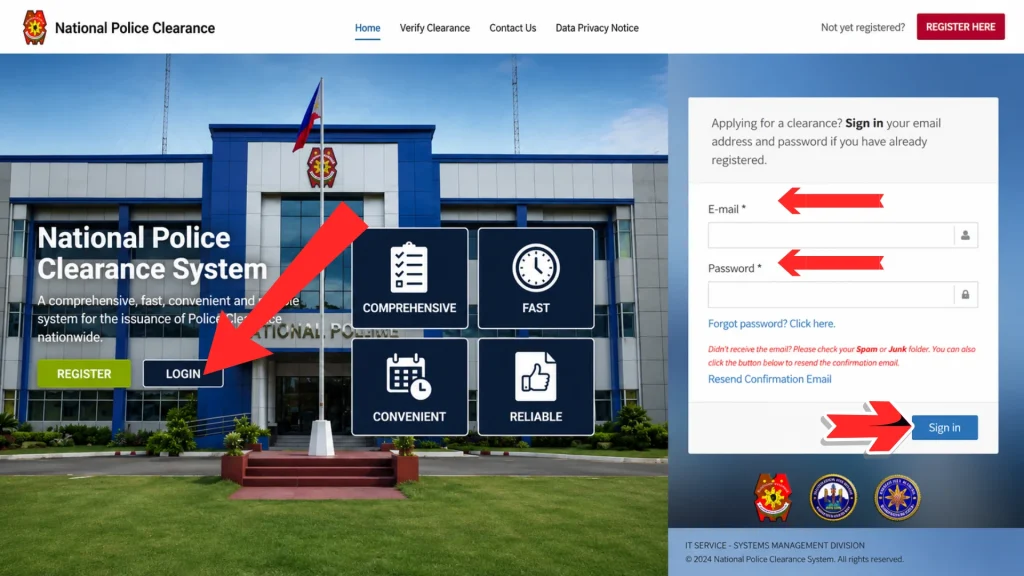
Forgot your password? Click the “Forgot Password” link on the login page. The system will send a password reset link to your registered email. Check your spam folder if you do not receive it within 5 minutes.
Step 3: Click Edit Profile or Update Application
Click the “Edit Profile” or the “Update Information” option. This is typically located at the bottom or top right of the application.
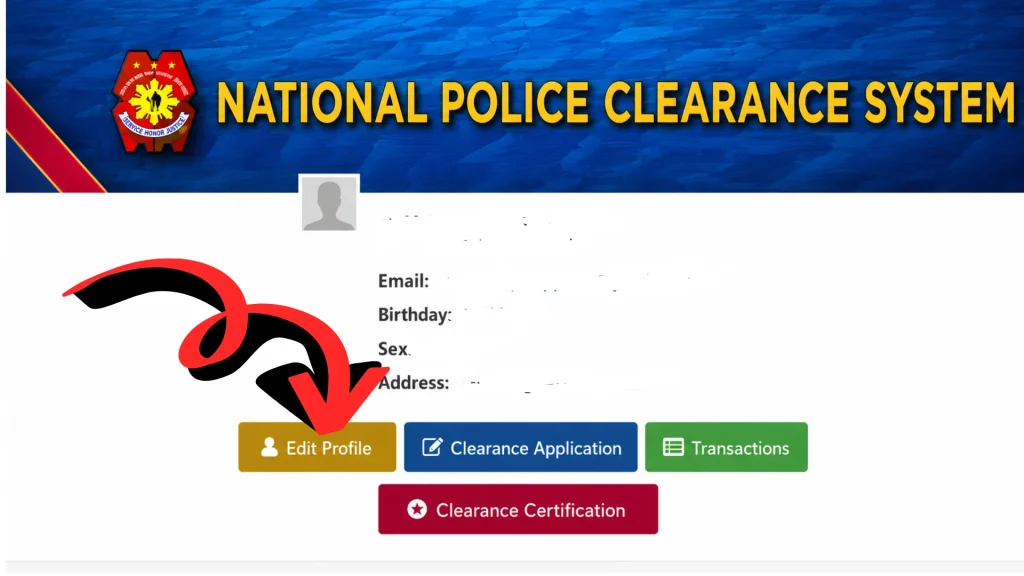
Note: The edit option is only available if your appointment date has not yet passed and your application status is still listed as “Pending” or “Scheduled.” If your appointment has already been completed or your clearance has been issued, you will no longer be able to edit the application through the portal.
Step 5: Update the Required Information
You can edit the following fields depending on what needs correction:
Personal Information Fields:
- First Name
- Middle Name
- Last Name
- Suffix (Jr., Sr., III, etc.)
- Date of Birth
- Place of Birth
- Gender
- Civil Status
- Nationality
Address Information:
- House/Unit Number and Street
- Barangay
- City or Municipality
- Province
- Zip Code
Application Details:
- Purpose of Clearance (Local Employment, Abroad, Firearms License, etc.)
- Appointment Date and Time
- Preferred PNP Station
- Make your corrections carefully. Double-check every field before proceeding.
Step 6: Upload Supporting Documents (If Required)
In some cases, particularly if you are changing your name or correcting your date of birth the system may prompt you to upload a supporting document to justify the change. Accepted documents typically include:
- Birth Certificate (PSA-authenticated)
- Valid Government-Issued ID (passport, SSS, UMID, PhilSys ID, etc.)
- Marriage Certificate (for married women updating their surname)
Step 7: Save and Confirm Your Changes
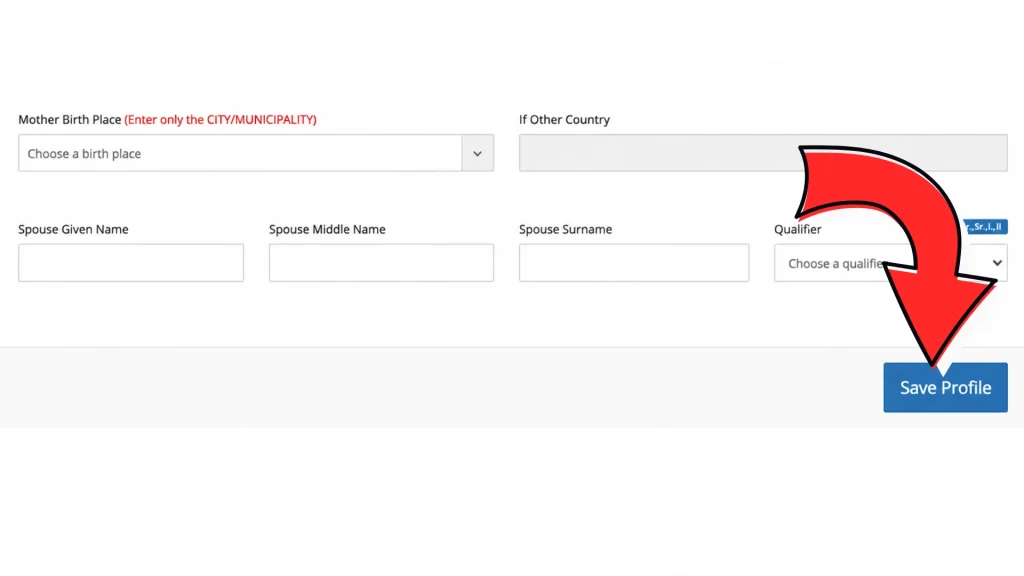
- After updating all necessary fields, scroll down to the bottom of the edit form and click the “Save Profile” or “Update” button.
- The system will display a confirmation message indicating that your changes have been saved successfully. You may also receive a confirmation email at your registered email address.
Step 8: Print or Save Your Updated Appointment Slip
After confirming your changes, download or print your updated appointment slip. You will need to present this slip on the day of your appointment at the PNP station.
What If Edit Profile Option Is Missing in Your Police Clearance Application
There are situations where the edit function may not appear or may be grayed out. Here is what to do in each scenario:
Scenario 1: Your Appointment Date Has Already Passed
If your appointment has already lapsed, the edit option will no longer be available. You will need to create a new application from scratch, book a fresh appointment, and repay the clearance fee.
Scenario 2: Your Application Status Is “For Verification”
Applications flagged for manual verification by the PNP cannot be edited through the portal. In this case, you need to visit the PNP Civil Security Group (CSG) office or the specific station where you booked your appointment to request manual correction.
Scenario 3: Technical Issues on the Portal
If the portal is down or you are experiencing login issues, try:
- Clearing your browser cache and cookies
- Using a different web browser (Google Chrome is recommended)
- Accessing the portal during off-peak hours (early morning or late evening)
- Contacting PNP support through their official channels
Scenario 4: Name Change Due to Marriage or Court Order
Name corrections that involve a legal document (e.g., married name or legally changed name) may require in-person processing at the PNP Civil Security Group office with the relevant legal documents.
Can You Edit Your Police Clearance Application After Payment?
Yes, in most cases, you can still edit your application details even after making the online payment as long as your appointment date has not yet passed and your application status remains “Pending” or “Scheduled.”
- Payment is non-transferable and non-refundable. If you created a new application after missing your appointment, you will need to pay the clearance fee again.
- Changing your PNP station after payment may or may not be allowed depending on your current application status. Some stations have restrictions on this once confirmed.
- If you paid through an over-the-counter payment channel (e.g., Bayad Center, 7-Eleven, LBC), make sure the payment is already reflected in your ISS account before attempting any edits.
How Long Does It Take to Edit and Reprocess a Police Clearance Application?
- The time required to edit and reprocess a police clearance application varies depending on the type of correction and the procedures of the issuing authority. Minor updates, such as correcting typographical or spelling errors, are often processed within a few business days.
- However, more significant changes involving personal identification details may require additional verification and can take several weeks to complete.
- To prevent delays, applicants should submit correction requests as soon as an error is identified. This is especially important if the police clearance certificate is needed for time-sensitive purposes, such as employment, immigration, or visa applications.
- Regularly monitoring your application status through the official portal or contacting customer support can help you stay informed throughout the correction process.
What If the PNP System Does Not Allow Editing?
Many applicants discover that certain critical details such as name or birth date cannot be edited directly online.
1: Contact Customer Support
Reach out to the official support team through available communication channels.
- Your application reference number
- Registered email address
- Description of the error
- Supporting identification documents
2: Visit the Police Clearance Office
If online correction is unavailable, visit your selected police clearance processing center.
Bring:
- Valid government-issued ID
- Application reference number
- Supporting documents proving the correct information
- The personnel can guide you through the correction process.
3: Request Manual Correction
Authorized personnel can verify your identity and process eligible corrections according to PNP guidelines.
Tips to Avoid Errors in Your Police Clearance Application
Prevention is always better than correction. Here are practical tips to help you avoid common application mistakes:
- Use Your PSA Birth Certificate as Your Primary Reference Always encode your full name, date of birth, and place of birth exactly as they appear on your PSA (Philippine Statistics Authority) birth certificate. This is the most authoritative document for name and birth details.
- Type Carefully Avoid Autocorrect Errors Mobile keyboards with autocorrect features can change proper names or unfamiliar words automatically. Type your information on a desktop or laptop for greater accuracy.
- Double-Check Before Clicking Submit Before finalizing your application, re-read every field. Even a missing middle initial or wrong zip code can cause issues during biometric verification.
- Use the Same Information Across All Applications Your name on your PNP clearance should be consistent with your other government IDs (passport, PhilSys, SSS, etc.). Discrepancies can cause problems in job applications, travel, and government transactions.
- Screenshot Your Completed Application Before submitting, take a screenshot of your filled-out form. This gives you a reference copy to compare against in case you need to make edits later.
FAQs About Edit Police Clearance Application Information Online
Conclusion
Correcting errors in your police clearance application as early as possible can save time, prevent processing delays, and ensure successful verification. Always review your details carefully before submission and use official PNP channels for any updates or corrections. Accurate information helps streamline the process and ensures your police clearance is issued without complications.